


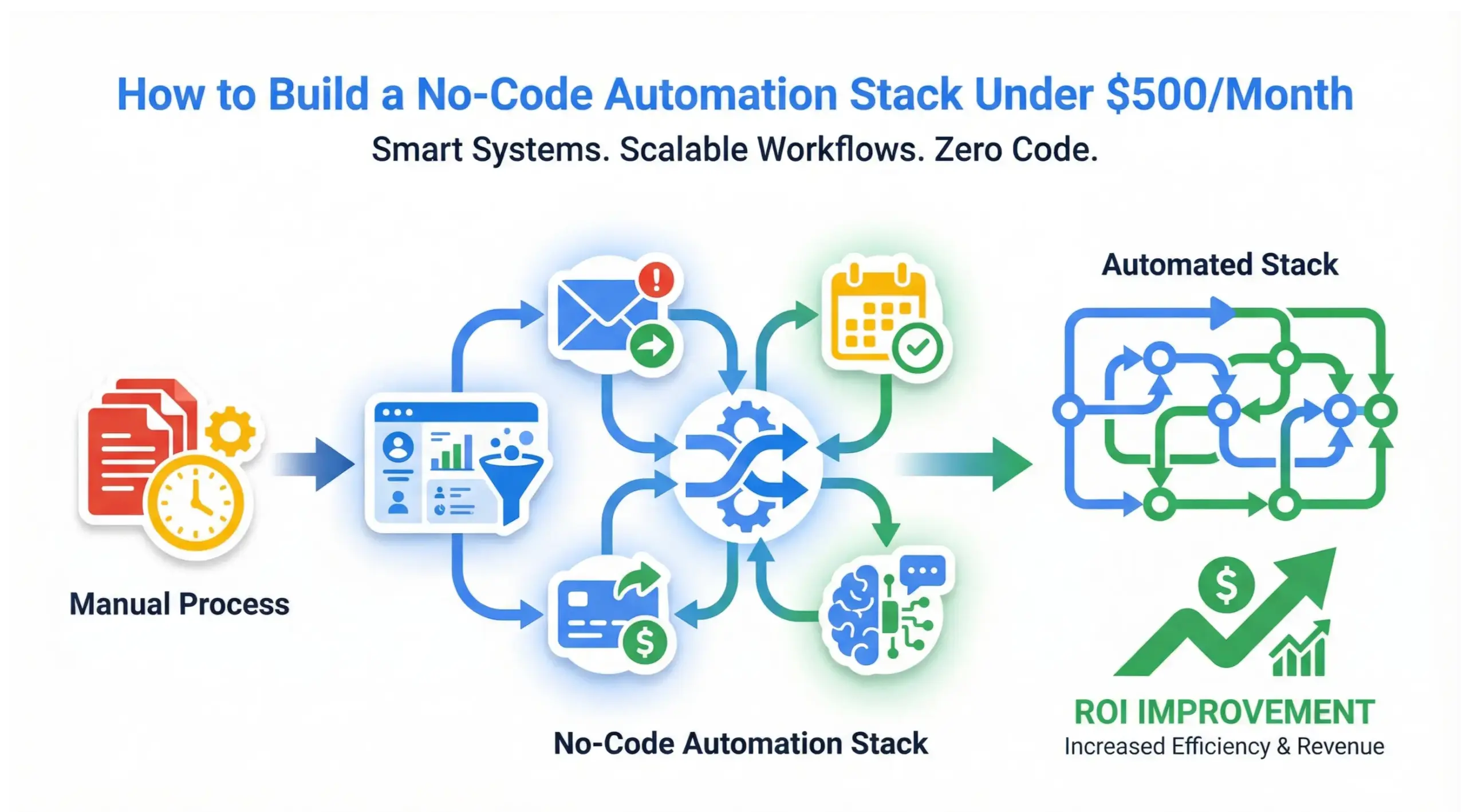
Building a no-code automation stack under $500 per month is completely achievable in 2026 using modern SaaS tools that connect workflows, automate repetitive tasks, and increase revenue without hiring a developer. With the right stack, small businesses can automate lead capture, CRM updates, email follow-ups, invoicing, reporting, and internal processes for less than the cost of one part-time admin.
This guide breaks down the exact tools, pricing, system architecture, ROI math, and implementation strategy – plus answers frequently asked questions at the end.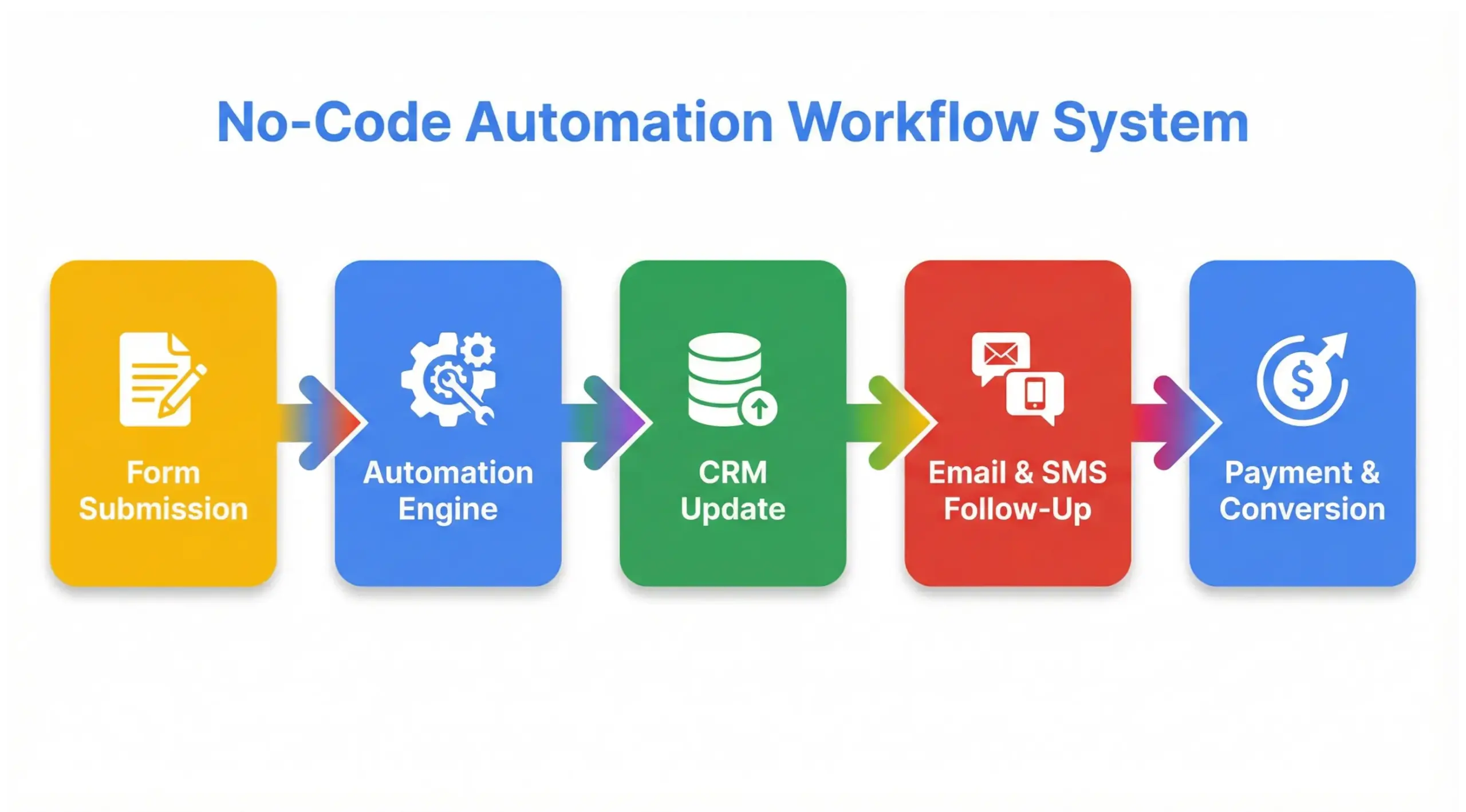
What Is No-Code Automation?
No-code automation refers to using software tools that allow businesses to create automated workflows without writing code. These tools rely on visual builders, drag-and-drop logic, and prebuilt integrations instead of programming.
Instead of hiring a developer to build APIs or scripts, business owners can connect apps like:
- CRM platforms
- Email marketing tools
- Payment processors
- Scheduling systems
- Form builders
- Chatbots
All without touching code.
“No-code automation replaces technical complexity with visual logic.”
Why Is No-Code Automation Growing So Fast in 2026?
No-code automation adoption is accelerating because:
- Developers cost more
- Businesses need speed
- SaaS ecosystems are more interconnected
- AI tools now integrate directly into automation workflows
- Small teams need scalability
According to industry trends, small businesses that automate workflows reduce administrative workload by 25-40%, depending on their operational model.
The result: leaner operations and higher profit margins.
What Can You Automate Without Coding?
Almost everything repetitive.
Revenue-Focused Automation
- Lead capture routing
- CRM pipeline updates
- Follow-up emails & SMS
- Appointment scheduling
- Invoice reminders
- Review requests
Operational Automation
- Data syncing between tools
- Task notifications
- Task assignment
- Reporting dashboards
- Customer onboarding sequences
Marketing Automation
- Behavior triggers
- Abandoned cart flows
- Lead nurturing sequences
- Social posting schedules
If it is rules-based and repetitive, it can be automated.
What Does a $500/Month No-Code Automation Stack Include?
Here is a realistic, scalable stack under $500/month.
| Tool Category | Recommended Tool | Monthly Cost | Purpose |
|---|---|---|---|
| Automation Engine | Make.com or Zapier | $29-$99 | Connect apps & build workflows |
| CRM | HubSpot Starter or GoHighLevel | $20-$97 | Lead tracking & pipeline |
| Email Marketing | MailerLite / Brevo | $20-$50 | Automated campaigns |
| Scheduling | Calendly | $12-$20 | Appointment automation |
| Forms | Tally or Typeform | $0-$35 | Lead capture |
| Payment | Stripe | % per transaction | Automated billing |
| AI Assistant | ChatGPT API / Claude API | $20-$50 | AI-powered automation logic |
Estimated Total:
$150 – $350 per month
Plenty of room under $500.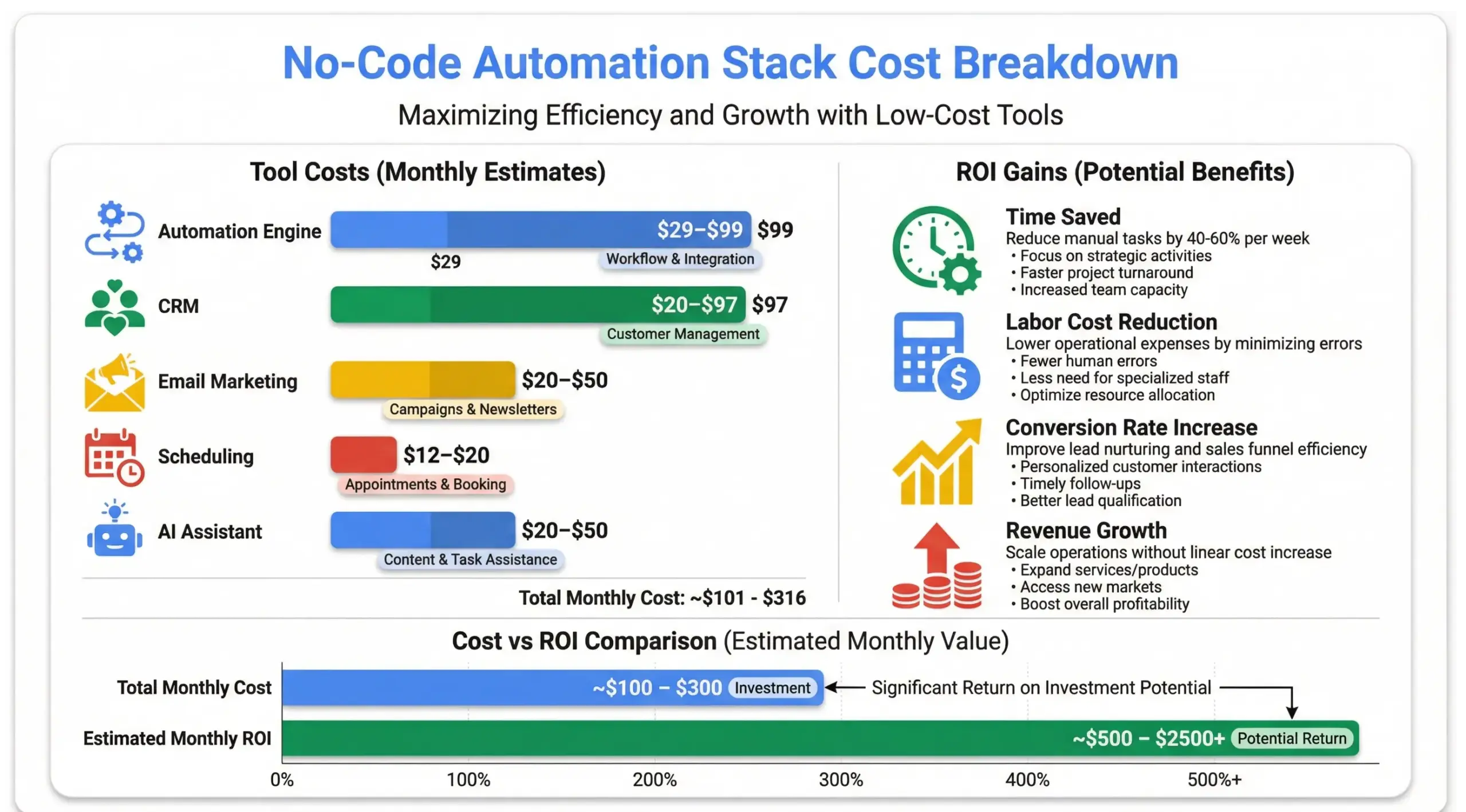
How Does a No-Code Automation Stack Actually Work?
A no-code automation stack works by connecting tools through triggers and actions.
Example workflow:
- Lead submits form
- Automation platform detects submission
- CRM contact created
- Email sequence triggered
- SMS follow-up sent
- Sales task assigned
- Pipeline updated
All automatically.
This replaces hours of manual processing.
What Is the ROI of No-Code Automation?
Let’s break down a realistic example.
Small Service Business:
- 150 leads per month
- 10 minutes manual processing per lead
- 1,500 minutes monthly = 25 hours
- Admin cost: $25/hour
Monthly cost of manual work: $625
Automation reduces this by 80%.
Savings: ~$500/month
Annual savings: ~$6,000
If automation increases conversion by just 10%, ROI multiplies.
Example:
- $500 average sale
- 15 extra conversions per month
- $7,500 additional revenue
Automation cost: $300/month
Revenue impact: $7,500
That is high-leverage ROI.
What Is the Best Automation Engine?
Two dominant tools:
Zapier
- Easy to use
- Large app ecosystem
- Best for beginners
- Higher cost at scale
Make.com
- More advanced logic
- Lower cost per task
- Better for complex workflows
- Slight learning curve
For a $500/month stack, Make.com often provides better scalability.
What Is the Difference Between No-Code and Low-Code?
No-Code
- No programming required
- Visual logic builders
- Designed for non-technical users
Low-Code
- Some scripting required
- More customization
- Used by technical teams
For small business automation, no-code tools are sufficient 90% of the time.
How Do You Design the Right Automation Stack?
Follow this 5-step framework:
- Map current manual processes
- Identify repetitive tasks
- Prioritize revenue-impact systems
- Choose scalable tools
- Build and test workflows
Automation without strategy creates tool clutter.
Strategy first. Tools second.
What Are Common Mistakes in No-Code Automation?
- Over-automating too early
- Not documenting workflows
- Poor CRM structure
- Not monitoring performance
- Using too many disconnected tools
Automation should simplify, not complicate.
Can No-Code Automation Replace Developers?
In many small business cases, yes.
For:
- Workflow automation
- CRM systems
- Email campaigns
- Integrations
- Reporting dashboards
However, enterprise-level customization may still require developers.
For startups and SMBs, no-code automation is more than enough.
How Long Does It Take to Build a No-Code Automation Stack?
Timeline:
- Week 1-2: Process mapping
- Week 3-4: Tool setup
- Week 5-6: Workflow building
- Week 7-8: Testing and optimization
Most businesses can fully automate core systems within 60 days.
How Does AI Enhance No-Code Automation?
AI now integrates directly into automation stacks.
Examples:
- Auto-generated email responses
- Lead qualification scoring
- Smart routing logic
- Content summarization
- Predictive follow-ups
AI amplifies automation impact.
Automation handles tasks.
AI enhances decisions.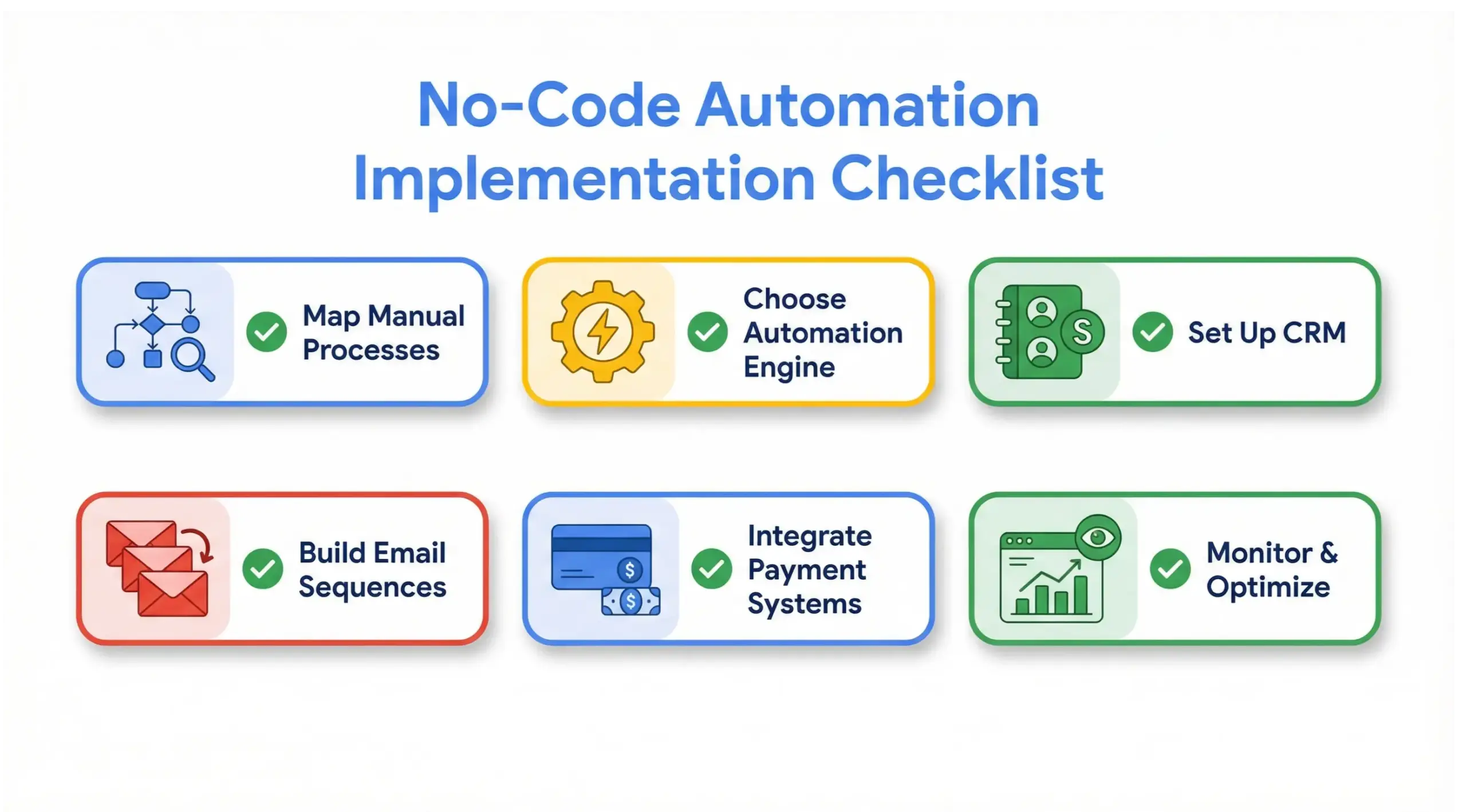
Real-World Stack Example Under $500
Example 5-tool build:
- Make.com – $29
- HubSpot Starter – $20
- MailerLite – $25
- Calendly – $12
- Stripe – transaction fees
- ChatGPT API – $25
Total: ~$111 – $250/month
Add scaling for growth and still stay under $500.
This stack can support:
- 1,000+ leads monthly
- Multi-step automation
- CRM tracking
- Email sequences
- Sales pipeline management
All without code.
10 Frequently Asked Questions About No-Code Automation
1. What is no-code automation?
No-code automation is the use of visual workflow tools that allow businesses to automate tasks without writing code.
2. Is no-code automation secure?
Yes. Reputable platforms use encryption, authentication layers, and secure APIs.
3. Can I automate my business without hiring a developer?
Yes. Most small business automation can be built entirely using no-code tools.
4. What is the cheapest no-code automation stack?
A lean stack can start around $150-$250 per month using Make.com, HubSpot, and email tools.
5. How much can automation increase revenue?
Automation can increase revenue by improving response times, consistency, and lead conversion rates.
6. Is Zapier better than Make.com?
Zapier is easier; Make.com is more powerful and cost-efficient at scale.
7. Do I need technical experience?
No. Most tools use drag-and-drop logic builders.
8. How long does implementation take?
Most stacks can be built within 30-60 days.
9. What industries benefit most?
Service businesses, agencies, SaaS startups, e-commerce, and consultants benefit heavily.
10. Is no-code automation scalable?
Yes. Modern tools can handle thousands of automated tasks per month without code.
Final Thoughts: Why No-Code Automation Is the Future
No-code automation empowers business owners to move faster, operate leaner, and scale without technical barriers.
For under $500/month, you can build a stack that:
- Automates repetitive work
- Improves conversion rates
- Reduces payroll dependency
- Increases operational clarity
- Supports long-term scalability
In 2026 and beyond, the businesses that automate intelligently will outperform competitors still relying on manual processes.
Automation is not a luxury expense.
It is operational leverage.


